


Looking for a fun way to pass the time without downloading an app or paying a fee? If you love simple word puzzles, the Text Twist classic game is the perfect five-minute escape. It’s one of those wonderful free online games you can play right in your web browser, making it ideal for a quick mental refresh during your coffee break. To know more, check out spellcstr.com
The idea behind the game is incredibly simple and instantly rewarding. You are given a set of six or seven jumbled letters, and your goal is to unscramble them to find as many hidden words as you can. Finding the special word that uses all the letters is how you advance to the next level, challenging you to think creatively with a familiar set of characters.
Of course, the word “free” can sometimes feel like a red flag online. Most safe versions of Text Twist are supported by small ads on the page, much like a magazine places ads next to its articles. This model means you never need to enter a credit card or install anything on your computer; the game simply plays on the webpage, just like watching a video.
Here’s a quick walkthrough on how to play, where to find trusted websites, and a few tips to help you spot more words. You’ll be unscrambling letters and solving your first puzzle in just a few minutes, completely risk-free.
How Do You Play Text Twist? A Simple 4-Step Guide
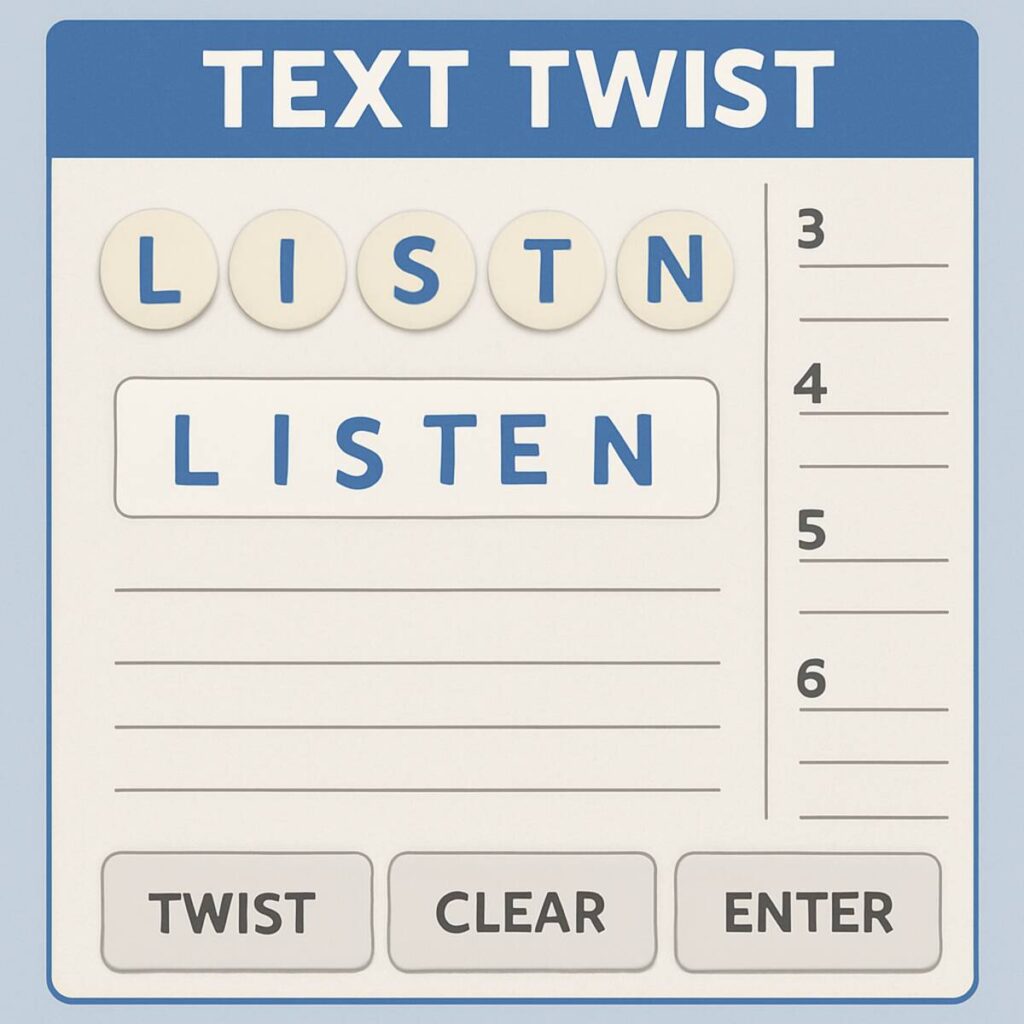
The beauty of Text Twist is how quickly you can learn to play. In each round, the game presents you with a set of six jumbled letters. Your task is to act like a word detective, unscrambling those letters to find as many words as possible. As you find words, they will fill in the empty slots on your screen, showing you what lengths of words are still left to discover.
- Observe the Letters: Take a moment to look at the six letters you are given for the round.
- Type Your Words: Use your keyboard to type any word you see, then press the ‘Enter’ key to submit it.
- Use the ‘Twist’ Button: Feeling stuck? Click the “Twist” button! This key feature shuffles the letters into a new arrangement, helping your brain spot combinations you might have missed.
- Find the Main Word: To win the round, you must find the one special word that uses all six letters.
While finding all the smaller three, four, and five-letter words is fun and adds to your score, spotting that main six-letter word is your ticket to the next level. All the words you find are essentially anagrams—different words made by rearranging the same group of letters. Once you find the big one, you’ve solved the core puzzle and can move on to a new challenge.
Where to Safely Play Text Twist & Similar Games for Free
Finding a safe, free version of the game is easy when you know where to look. You don’t need to download or install anything, as the best and safest versions of Text Twist are “browser-based.” This simply means they run directly on a webpage, just like watching a video, which is the key to playing securely and quickly.
Finding a trustworthy site can feel tricky, but you can’t go wrong by starting with large, established game portals. These websites have a long reputation for hosting high-quality, free online games.
To get started right away, here are a few of the most reliable destinations:
- ✔️ MSN Games: A long-time host of the official game, this is the best place to find the classic MSN Games Text Twist experience. They offer Text Twist 2, which is widely considered the definitive version.
- ✔️ Arkadium: This site offers a clean, modern version of Text Twist that is easy to play on both computers and mobile devices. You can jump right in without creating an account.
Think of these portals like major TV networks—they have a reputation to protect and provide a reliable, safe environment for entertainment. Because they are well-known, versions like Text Twist 2 are often unblocked at schools or workplaces for a quick break. Whether you want to play on your computer or play Text Twist on mobile, these sites typically adjust automatically to your screen.
Sticking to these well-known hubs is your best bet for a good experience. But what if you find another site through a search? It’s just as important to know what to avoid.
3 Red Flags of an Unsafe Game Website
Venturing beyond the big portals can sometimes lead you to a site that seems a bit… off. Trusting your gut is a key part of safe online games. If a website feels chaotic or confusing, it’s best to simply close the tab and try another. Knowing how to avoid game scams starts with spotting a few common warning signs.
First, be wary of any page that is overloaded with flashy advertisements. While a few ads are normal (it’s how free sites operate), your screen shouldn’t be covered in blinking pop-ups or banners that shout “Congratulations!” A good game site focuses on the game itself, not on distracting you with dozens of commercials.
Another major red flag is a prominent “Download” button. Remember, a true browser game doesn’t require you to install anything. These buttons are often deceptive ads designed to trick you into downloading software you don’t need. The real game should load directly on the page, with a simple “Play” or “Start” button located right on the game window itself.
Finally, a simple word puzzle should never ask for your personal information. If a site demands your email address, name, or—most importantly—your credit card details just to play, close the page immediately.
A Simple Strategy to Find All the Words
Staring at a jumble of letters and only finding a few small words can be frustrating, especially when the clock is ticking. One of the best tips for beating timed mode is to build on the words you already have. Whenever you find a simple word, like PLAY, immediately try adding common endings to it. You can almost always find extra points by simply typing PLAYS, PLAYED, and PLAYING. This easy habit can quickly double or triple your word count without much effort.
Another powerful word jumble solver strategy is to stop looking for single letters and start looking for common clusters. Our brains are trained to recognize familiar letter pairs like TH, SH, CH, and ST. Scan the letters for these combinations first. If you spot a T and an H in the jumble, mentally group them together. This turns a confusing mess of letters like G-H-T-I-L into a much simpler puzzle, making it easier to see the word LIGHT.
If your eyes start to glaze over from looking at the letters in the same order, use the “Twist” button! This is the most important feature of the game for a reason. Hitting that shuffle button rearranges the letters, forcing your brain to see them in a new way. A word that was completely hidden a moment ago can suddenly pop out just because two key letters are now next to each other. Don’t be afraid to use it every few seconds when you feel stuck.
By combining these approaches, you develop a complete Text Twist strategy to find all words, not just the obvious ones. You’ll begin to see endings, spot letter groups, and know when to reshuffle to get a fresh perspective. Once you master finding the smaller words with these tricks, you’ll be ready to hunt for the big one: the special word that uses every single letter.
How to Always Find the Bonus Word in Text Twist
While finding lots of small words is great for your score, there’s one special word that truly matters in every round. This is the main anagram, sometimes called the “bonus word,” and it’s the only word that uses every single letter on the screen. For example, if you are given the letters P-A-R-T-Y, the bonus word is PARTY. It’s the solution to the main puzzle.
This word is so important because you cannot advance to the next level without it. You could find every other possible word, but the game will not let you move on until you unscramble the one that uses all the letters. Think of it as the key that unlocks the next round.
Because it’s the only way to win, the best Text Twist strategy is often to look for this long word first. Before you start typing out short words like art and try, take a moment to scan for the big one. Finding it early takes all the pressure off, allowing you to have fun finding the smaller words without the stress of being stuck on the final puzzle.
3 Tips for Beating the Clock in Timed Mode
When that timer starts ticking down, your first instinct might be to hunt for the big bonus word. A better Text Twist strategy, however, is to start small. Focus on spotting and submitting all the easy three- and four-letter words first. This approach banks quick points and builds momentum. Seeing these simple combinations also warms up your brain, making it easier to recognize the patterns inside longer, more complex words as the clock winds down.
Your best friend in a timed game is the “Twist” button. Don’t wait until you’re completely stumped to use it; click it frequently. Each time you shuffle the letters, you break up the mental fixation you have on their current order. This simple reset can instantly reveal a word that was hiding in plain sight. Think of it less as a panic button and more as a primary tool for giving your eyes a fresh look every ten seconds or so.
It may sound strange, but one of the most effective tips for beating timed mode is to stop watching the clock. The constant pressure of a countdown creates anxiety, which can actually slow your thinking. Try to focus only on the letters in front of you. Some people even find it helpful to physically cover the timer on their screen. By removing that single source of stress, you allow your mind to concentrate fully on the word-finding puzzle.
Is Playing Text Twist Good For Your Brain?
You might wonder if a simple game like Text Twist is actually good for your brain. The short answer is yes. While it feels like a fun distraction, engaging with word games provides a light mental workout. Every time you unscramble letters, you’re either discovering a new word or reinforcing one you already know. This constant recall helps keep your vocabulary active, making it an enjoyable and simple form of brain training without the pressure of a formal lesson.
Beyond just words, the game sharpens a core mental skill: pattern recognition. Your brain quickly learns to sift through the jumble to spot familiar letter combinations and common word endings, like “-ing” or “-est.” It’s a bit like a “find the hidden object” puzzle, but for language. This ability to find order in chaos is a useful muscle to flex, helping you see connections more quickly in other daily tasks.
Ultimately, the benefits of word games like Text Twist are that they offer a relaxing, low-stress way to stay mentally engaged. You’re giving your mind something to chew on without it feeling like a chore. It’s a guilt-free break that entertains you while keeping you sharp.
3 More Free Word Games If You Love Text Twist
Love the simple challenge of Text Twist? If unscrambling a jumble of letters is your perfect five-minute escape, you’ll be happy to know there are other fantastic and free games that offer a similar kind of fun, just with a slightly different twist. They’re perfect for when you want to mix things up.
While Text Twist is all about finding words from one set of letters, other games change the layout. Some challenge you to find words in a connected grid, and others use your discovered words to fill in a puzzle. This small change makes for a fresh but familiar experience. When you’re searching for games similar to Text Twist online, these are the styles you’ll often find.
Here are three popular and free options to try:
- Boggle (Online Versions): Instead of a line of letters, you get a square grid. The goal is to find words by connecting letters that are touching up, down, and diagonally. It’s a fast-paced hunt for patterns.
- Wordscapes: A relaxing and popular mobile game. You are given a wheel of letters at the bottom of the screen and swipe to connect them, forming words that fill in a crossword puzzle above.
- Wordament: Think of this as a massive, online competition of Boggle. You play on the same grid as hundreds of other people at the same time, all trying to find as many words as possible before the timer runs out.
Each of these games delivers that same satisfying “aha!” moment when you spot a word you didn’t see before. They’re a wonderful way to keep your brain engaged without feeling like you’re doing homework, making them a great addition to your list of go-to brain breaks.
Your 5-Minute Brain Break Awaits
You now have everything you need to enjoy a classic word puzzle. With an understanding of the rules, a list of safe websites, and a few key tricks, a moment of boredom can become a fun mental challenge. Instead of scrolling, you can enjoy one of the best free word games for a quick and satisfying break.
It’s an easy way to relax your mind while keeping it sharp, without any downloads or hidden costs. So go ahead-click on one of the safe links mentioned earlier and start playing. Your first round is just a click away.